




Building a custom AI agent sounds like the next logical step until you start asking how much it’s actually going to cost. At ProductCrafters, we advise against fixating on a single number. Instead, focus on making your investment efficient and future-proof. According to McKinsey’s State of AI 2025 report, 72% of organizations now use generative AI — up from 33% in 2024 — yet only 6% qualify as “AI high performers” capturing real value.


AI Spending in IT Markets, Worldwide, 2024–2026
| Market | 2024 | 2025 | 2026 |
|---|---|---|---|
| AI Services | $259B | $283B | $325B |
| AI Application Software | $84B | $172B | $270B |
| AI Infrastructure Software | $57B | $126B | $230B |
| GenAI Models | $6B | $14B | $26B |
| AI-optimized Servers | $14B | $18B | $330B |
| AI Processing IaaS | $139B | $209B | $268B |
| AI PCs by ARM and x86 | $51B | $90B | $144B |
| GenAI Smartphones | $245B | $298B | $393B |
| Total AI Spending: | $988B | $1.48T | $2.02T |
Source: Gartner (September 2025)
In this article, we’ll break down what really drives AI agent development costs, how to plan your budget wisely, and how to build a system that performs well without draining resources.
It is a good idea to start by defining exactly what you want the AI agent to achieve. Considering automating customer service? Make supply chain decisions smarter? Or give your employees a virtual assistant that actually helps? The problem you’re trying to solve determines the AI’s complexity, the types of AI models it needs, and how much integration work is involved. Trying to create a generic, “do-it-all” solution usually backfires. In opposite, it takes longer to build and ends up costing more.
Start With a Clear Use Case
Before developing an AI agent, it’s essential to define the specific problem you want it to solve. Clear use cases guide custom AI agent development, helping determine which AI models are needed, the agent development cost, and integration requirements. Whether you’re creating basic AI agents for customer support or advanced AI agents for complex decision-making, understanding your goals upfront ensures that developing an AI agent is efficient and cost-effective. Attempting a generic solution often inflates development cost and slows agent development.
Scope and Timeline Are Key
An AI agent cannot be developed in a single step. Preparation of data, training models, testing, fine-tuning, and deployment are all part of the process. Each of these stages takes time and resources. A large project involving many features, several system integrations, or continuously learning features requires more computational power, developer hours, and ongoing maintenance.
Cheap AI Models Can Cost You More in the Long Haul
At first glance, going for a bare-bones low-cost solution might seem like the way to go, but then the costs start to creep up on you. Things like:
- Constant patch-ups and downtime because the developers were in such a rush, they didn’t have time to get it right
- Scalability problems, which means it costs a bomb to get your systems to handle increased demand
- Integration nightmares when they can’t connect to your existing systems – a real headache
A well-thought-out AI agent may set you back a bit more upfront, but it ends up saving you a ton in the long run, providing better performance, being way more reliable, and delivering a much better return on investment.
Table of Contents
Key Cost Factors in Agentic AI Development
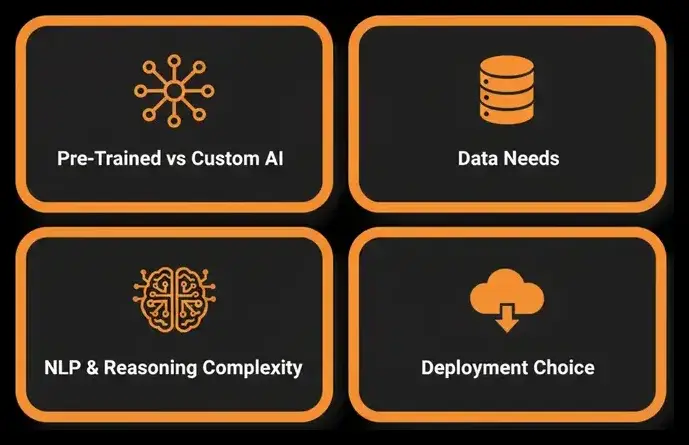
The cost of developing your own AI agent project varies. It all depends on a variety of factors like what your AI models project needs technically, how much data you need, and what kind of infrastructure you’re working with. Knowing what these factors are from the get-go helps you keep a handle on your budget and avoid getting blindsided by unexpected expenses down the line.
Pre-Trained vs Custom AI – A Cost vs Flexibility Trade-Off
One of the biggest decisions you’ll make is whether to use a pre-trained AI model or build one from scratch. Pre-trained AI models are quick and easy to roll out, but they might not be as customizable as you need them to be. Custom models, on the other hand, give you the tailored intelligence you’re after but take a lot longer to develop, plus you need to get the data ready and train the model itself, which adds hours and dollars to the price tag.
Data Collection: The Lifeblood of Any AI Agent
Your AI agent needs data to function, and costs tend to rise with the amount and quality of data you need. If you’re working with large, labelled datasets or synthetic data generation, you’ll be looking at a bigger bill. And then there’s the added regulatory overhead that comes with handling sensitive data – think healthcare or finance.
When it comes to storage and data pipelines, you’re looking at both cloud and on-premises options, and costs will go up the more you use them.
Reasoning Capabilities and Natural Language Processing
The more complex your NLP or reasoning capabilities, the higher the cost of AI development. Basic intent recognition might be cheap but multi-turn conversations, context awareness and domain-specific reasoning all require a lot more architecture and fine tuning.
Cloud or On-Premises – What’s the Cost of Choice?
Where you run your AI agent makes a big difference. Cloud platforms like Google Cloud, Azure AI, and AWS AI services are great for scalability and quick deployment, but you’re on the hook for ongoing subscription costs. On the other hand, on-premises deployment gives you full control, but you need to shell out for infrastructure upfront and then keep on top of maintenance costs.
By understanding these factors, you can make better decisions and build a cost-effective AI agent that gets the job done without breaking the bank.

Different Types of AI Agents – And What They Cost
Not all AI agents are created equal. The cost you’ll pay is heavily dependent on what your agent does, how much autonomy it has, and what technical depth you need. A simple chatbot has very different needs to a fully agentic system capable of reasoning, planning, and executing tasks on its own.
Below is a breakdown of agent types, their core features, use cases, and typical cost ranges:
| Type of AI Agent | Core Functionality | Use Case Example | Estimated Cost Range |
|---|---|---|---|
| Reactive / Simple Reflex Agent | Responds to user input with rule-based logic, no memory or planning | Basic chatbots, FAQ assistants | $20,000 – $35,000+ |
| Contextual / Model-Based Agent | Maintains short-term memory, tracks context, handles multi-step flows | Onboarding bots, internal knowledge assistants | $40,000 – $70,000+ |
| Autonomous Agent | Adds planning logic, tool orchestration, and decision workflows | Task automation, multi-step workflows | $80,000 – $120,000+ |
| Domain-Specific Agent | Customized for regulated or vertical industries (healthcare, finance) | Legal assistants, medical diagnosis support | $100,000 – $200,000+ |
For most organizations, starting with a contextual or semi-autonomous agent gives you a lot of bang for your buck whilst keeping a lid on AI development costs. And if you do need to move towards a fully agentic AI down the line, you’ve got the option to do so. Aligning with your business goals is a given, but building a fully autonomous system too soon can be a recipe for disaster — you can end up throwing good money after bad if your system isn’t delivering in the short term. It makes much more sense to kick things off with a simpler version and scale up as you get more confidence in how well it’s performing.
Learn more about the different types of AI agents and their capabilities.
“Your team went above and beyond and built an interesting project in very short time.”
Director of Engineering, Salesforce
Saket Agarwal

The Hidden Costs Nobody Likes to Talk About
AI development might get a lot of attention but it’s rarely the biggest area of spending. The real expense starts when your AI agent goes live and starts interacting with users . At that point a whole load of extra costs start to appear on the horizon and can quietly whittle away at your budget over time. These are the “hidden costs” that make the difference between a system that scales and one that drains resources without any real return.
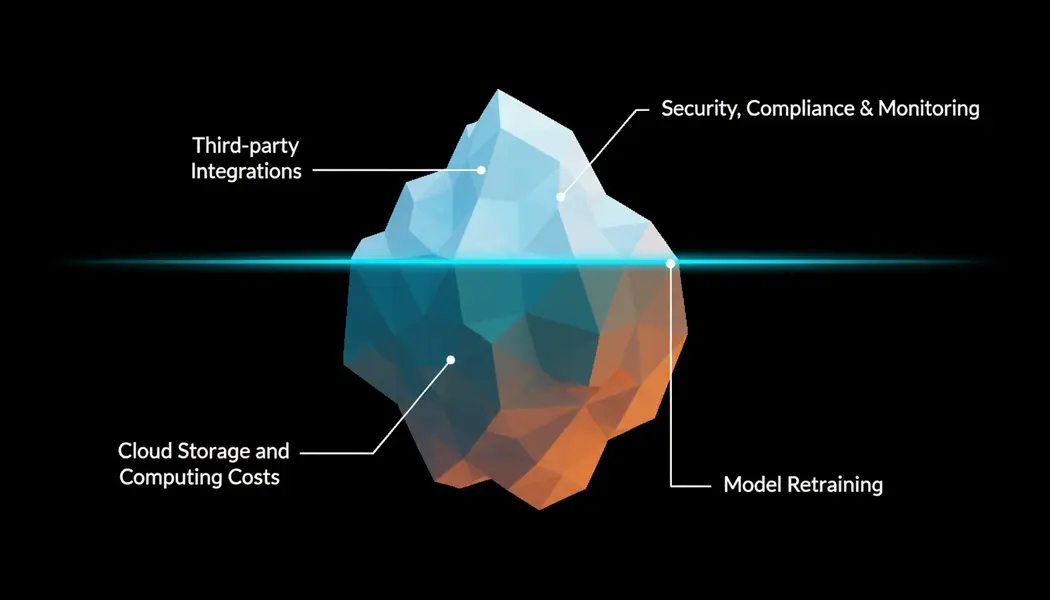
1. Model Retraining as your data evolves
Your AI is only as good as the data it was trained on – and that data is a moving target. User preferences shift, industries evolve, and business priorities change. Over time, that means your model starts to get less accurate, and before long, your are starting to get some pretty dodgy decisions, or worse still, your AI starts hitting compliance problems. To keep on top of this, you’re going to have to retrain your models on a pretty regular basis – every few months, or even every month if you’re using a lot of data. That involves fresh data labelling, model tuning, validation cycles, and sometimes even scaling up your infrastructure to handle the new data. It’s more than a technical process; it’s a significant ongoing operational expense that needs skilled engineers and a solid feedback loop.
2. Cloud Storage and Computing Costs
AI systems need some serious processing power – whether you’re on Google Cloud, AWS, or Azure AI. Cloud expenses can quickly get out of hand, especially if your agents are doing some pretty complex stuff or handling real-time queries. Storage for training data, logs, and embeddings can get expensive and is often overlooked in the planning stages. You will also be paying for GPU or TPU time, API calls, and data transfer. As your user base grows, those small costs per query start to add up to a pretty big monthly bill pretty quickly. Having a smart cloud strategy (using things like model compression, cached responses, and hybrid setups) can go a long way to cutting down those long-term expenses. Without optimization, these costs can more than double your total budget.
3. Security, Compliance & Monitoring
If your AI is handling sensitive information like medical data or financial records, then compliance is not a suggestion – it’s a must. You need to meet all sorts of strict frameworks like GDPR, HIPAA, or SOC 2. That means ongoing monitoring, regular encryption updates, access audits, and documentation. These aren’t add-ons, they’re essential steps that keep your system secure and legally sound.
You will also need to have the right tools for real-time anomaly detection and threat prevention to avoid data leaks or model tampering. Security is one of those areas that is all too often overlooked in AI projects – and a lot of teams don’t realize how important it is until something goes wrong.
4. Third Party Integrations and API call costs
Your AI agent isn’t a solo act – it’s going to be connecting to all sorts of other systems like payment gateways, CRMs, analytics tools, or language models. And every one of those connections has a price tag. NLP APIs might charge a few cents per request, but when you’ve got thousands of users interacting every day, the total bill can add up fast.
Integrations with databases or automation platforms bring ongoing costs and dependencies that need reviewing and tweaking over time. Those connections that make your AI agent so useful and powerful also create continuous financial commitments that you can’t ignore.
At the end of the day, building the AI agent is the first step. Maintenance, retraining, security, and scaling end up costing more than the initial development within the first year. The teams that plan for these ongoing expenses, invest in efficient infrastructure, and design with modules in mind are the ones that get the best return on investment. Those who don’t often find their shiny new AI product is quietly bleeding cash year after year.
Cost Estimation: The Real Cost of Building an AI Agent
There isn’t a one-size-fits-all price tag for creating an AI agent. Its cost normally stacks up stage by stage, each with its own complexities. Understanding where costs add up, from discovery to ongoing maintenance, helps you make informed decisions, avoid costly rework, and actually see your budget make a difference.
1. Discovery and Design ( $5K to $15K)
Most successful AI projects start long before any coding or model training gets underway. Discovery is all about defining the AI’s purpose, core functionality, and what you can measure. Are you building a simple bot that reacts, or a smart assistant that can think for itself?
You’ll also have to dig into your data, and that means examining how messy it is, whether you’ve got the right kind of data, and whether you’ll need to put in extra work to get it clean.
Deliverables: requirements document, architecture overview, data review, UI/UX wireframes
Cost drivers: not knowing what you want, missing data, changing your mind mid-project
A solid discovery phase can save you up to 30% of the total budget, which is a lot to risk by not doing it. Think about it like building a house without drawing up the plans first.
2. Model Setup and Training ( $10K to $40K)
Your AI starts to take shape at this point. The team decides on or tweaks a model (LLM, transformer, or reinforcement-based) that fits your needs. Most of the time, it makes sense to use a pre-trained model and then fine-tune it on your specific data. That way, you can save months of AI development time and cut back on GPU costs.
Deliverables: trained model, performance metrics, integration plan
Cost drivers: data quality, model size, how often you train it, and infrastructure usage
Using pre-trained models can be a huge time-saver, but if you’re dealing with proprietary or regulated data, you might need to spend more on fine-tuning and validation.
3. Integration and Workflow Orchestration ( $20K to $50K)
Now your AI is moving out of the theory phase and into reality. Integration is all about hooking up the model to other systems, including APIs, databases, CRMs, or enterprise tools. Each one of those connections adds up in both development and testing time.
Deliverables: integration layer, automation workflows, API endpoints
Cost drivers: how complicated the APIs are, how many third-party services you’re using, and security requirements
A lot of teams underestimate this step, but one broken connector or an API that’s rate-limited can throw a wrench into weeks of work. If you design reusable integration modules early on, it really pays off down the line.
4. Testing and Validation ( $5K to $15K)
AI testing is way different from traditional software QA. It’s more than simply verifying the code, because you also have to check the AI’s behavior, accuracy, and fairness. QA teams run real-world scenarios, deal with ambiguous queries, and assess how well the AI can reason.
Deliverables: QA reports, validation metrics, user acceptance testing
Cost drivers: how many test scenarios you’ve gotta run, whether it’s manual or automated QA, how efficient your feedback loop is.
Skipping thorough testing is a big risk. Mistakes can multiply fast once users start interacting with the system, which can lead to costly retraining – or even damage to your reputation.
5. Deployment and Monitoring ( $10K to $30K)
Your AI agent is live, but deployment is as important as getting it up and running. Cloud platforms like AWS, Azure, or Google Cloud can give you scalable infrastructure. However, costs vary depending on traffic, uptime requirements, and hosting model.
Deliverables: deployed model, monitoring dashboards, CI/CD pipelines
Cost drivers: hosting provider, traffic volume, model size, performance SLAs
Having a solid DevOps setup helps prevent bottlenecks and unexpected cloud costs. Automated deployment pipelines and monitoring dashboards can save up to 40% on monthly expenses – which is no small thing.
6. Maintenance and Scaling (Annual) ( $10K to $50K+)
Once your AI is live, the work isn’t over. Maintenance means retraining models as data evolves, integrating new features, and making sure you comply with privacy and regulatory standards. As usage grows, so do computing demands and costs.
Deliverables: regular updates, retraining schedules, performance audits
Cost drivers: data evolution, compliance rules, user growth
Annual maintenance usually works out to 15-25% of the initial build cost. However, fast-growing systems can exceed that. Companies that treat maintenance as an ongoing investment rather than a one-off expense see way better ROI in the long run. Deloitte’s State of AI in the Enterprise 2026 report found that nearly three-quarters of companies report their most advanced AI initiatives met or exceeded ROI targets — with around 20% seeing returns over 30%.
The cost of building an AI agent unfolds in stages from planning to deployment to continuous improvement. The most efficient teams see each stage as an opportunity to refine the next. Those who skip discovery or underfund testing often end up paying for extra work later. Planning for the entire lifecycle makes for AI systems that perform smoothly, scale well, and stay affordable to run.
| Development Phase | Estimated Cost | Complexity Level | Key Deliverables | Purpose / Value |
|---|---|---|---|---|
| Discovery & Design | $5K – $15K | Low | Requirements, architecture draft, UI/UX wireframes | Define goals, scope, and technical roadmap. Reduces rework and clarifies priorities. |
| Model Setup & Training | $10K – $40K | Medium | Trained model, performance benchmarks, integration plan | Establish core AI intelligence. Fine-tuning vs. pre-trained models determines cost efficiency. |
| Integration & Workflow Orchestration | $20K – $50K | High | API connectors, automation workflows, data pipelines | Connect AI agent to real systems. Determines usability, scalability, and ROI. |
| Testing & Validation | $5K – $15K | Medium | QA reports, validation metrics, UAT results | Ensure reliability, fairness, and performance in real-world scenarios. Prevent costly rework. |
| Deployment & Monitoring | $10K – $30K | Medium | Cloud deployment, CI/CD pipelines, monitoring dashboards | Make the agent operational. Optimized cloud and monitoring reduce ongoing costs. |
| Maintenance & Scaling (Annual) | $10K – $50K+ | High | Model retraining, updates, performance audits | Keeps AI relevant, compliant, and scalable. Accounts for hidden operational costs. |

AI Agent Pricing Models in 2026
How you pay for an AI agent matters almost as much as what it costs to build. The pricing landscape in 2026 is shifting from flat subscriptions toward usage-based and per-task billing — and that shift directly affects your long-term budget.
| Pricing Model | How It Works | Typical Range | Best For |
|---|---|---|---|
| Per-seat subscription | Fixed monthly fee per user | $20–$500/user/month | Internal tools, team productivity |
| Per-conversation / per-task | Pay per interaction or completed task | $0.02–$1.50 per interaction | Customer support, high-volume |
| Tiered subscription | Volume-based tiers with usage caps | $500–$5,000/month | Mid-market, predictable volume |
| Custom build + hosting | One-time build + monthly infra | $15K–$200K + $500–$10K/mo | Unique workflows, IP ownership |
Usage-based pricing shifts budget risk to you. At low volume it’s cheap, but costs scale linearly with adoption — which is exactly when you can least afford surprises. If you go this route, negotiate usage ceilings and overage schedules before signing.
A real-world example: $0.02 per conversation in production
One of our clients — a US fitness app with thousands of daily users — was hemorrhaging money to chargebacks because their support team couldn’t respond to refund requests fast enough. By the time someone replied four hours later, the customer had already disputed the charge with their bank. Lost revenue, processor fees, merchant account risk. Manual 24/7 staffing would have cost more than the chargebacks themselves.
We built an autonomous support agent that pulls user activity data from Amplitude to check refund eligibility against policy, drafts a policy-compliant response, and creates a CRM ticket with a proposed decision for the support team to approve. Human-in-the-loop on the action, but the agent does all the reasoning and drafting work. PII strips out before anything reaches the LLM.
Reply time dropped from four hours to under one minute. Operating cost runs $0.02 per conversation across thousands of daily users. Compare that to per-conversation SaaS pricing at $0.15–$1.50 — the architecture pays for itself within months because there’s no platform fee, no per-task markup. Just the LLM call, the integrations, and infrastructure the client owns outright. Token usage is tracked in real-time through the admin dashboard so spend never surprises anyone.
-
 USA
USA

- LangSmith
- LangGraph
- 1 min Reply time
- $0.02 Conversation
- 60 days Duration
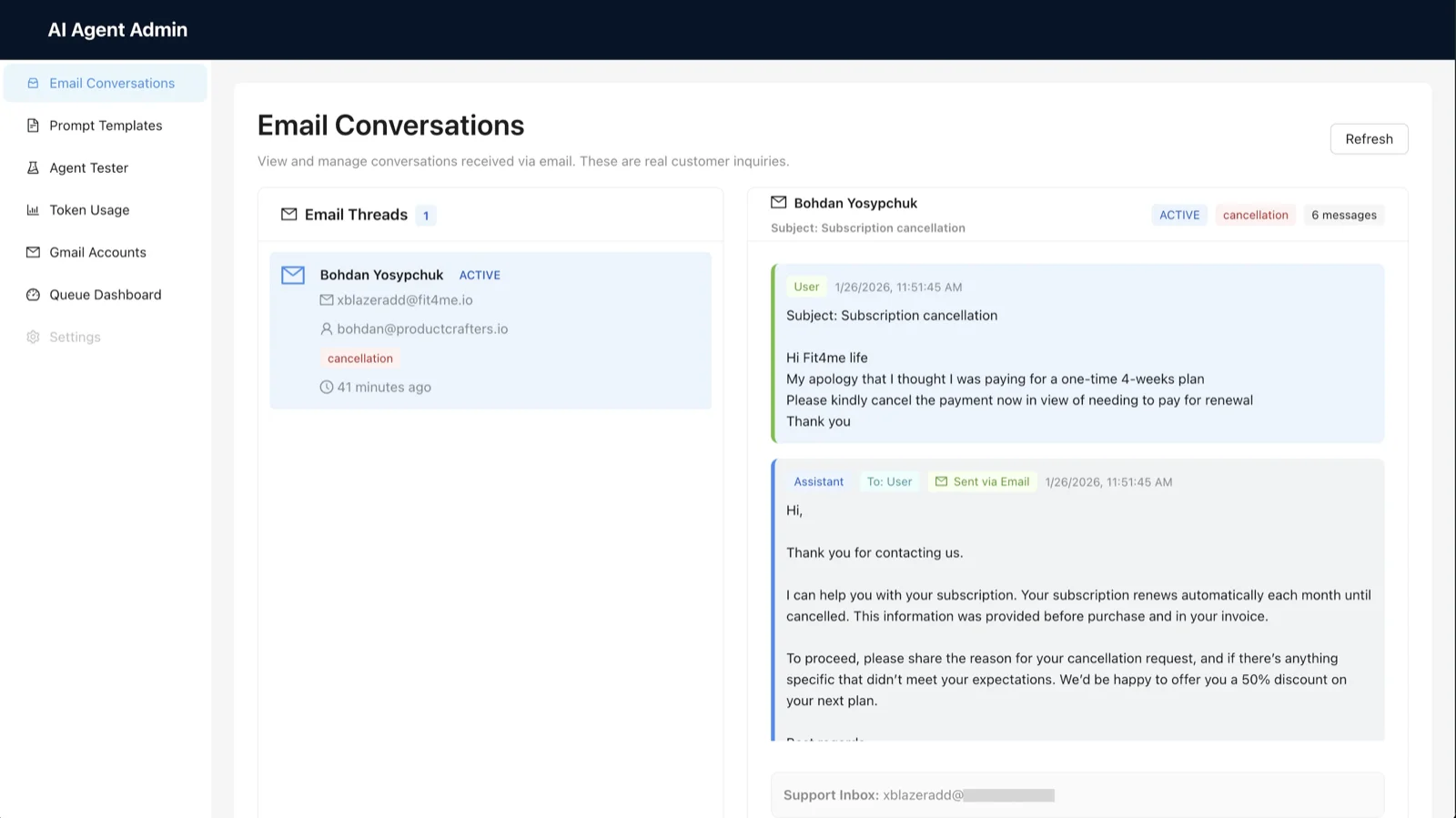

For teams that need full cost control and IP ownership, custom development with fixed hosting costs often makes more financial sense at scale. You pay more upfront, but your month-to-month expenses become predictable rather than tied to growth metrics you can’t fully control.
Build vs. Buy: Which Approach Fits Your Budget?
Before committing $50K+ to custom development, evaluate whether a pre-built platform solves your problem at a fraction of the cost. For basic FAQ bots or standard tier-1 support, tools like Intercom Fin or Zendesk AI handle the job at $50–$500/month.
| Factor | SaaS Platform | Custom Build | Hybrid |
|---|---|---|---|
| Upfront cost | $50–$500/month | $15K–$200K+ | $5K–$50K + sub |
| Time to deploy | Days to weeks | 2–6 months | 2–8 weeks |
| Customization | Limited | Full control | Moderate |
| Vendor lock-in | High | None (you own IP) | Moderate |
| Best for | Standard use cases, low volume | Unique workflows, regulated, scale | Validated case, fast iteration |
Custom development is the right call when (1) your workflow can’t be templated, (2) you need deep integration with proprietary systems, (3) you’re in a regulated industry like healthcare — see how we built a multi-agent health system for Healify, or (4) you need full IP ownership.
The hybrid approach works well for growth-stage companies: start with a SaaS tool to validate the use case, then migrate to custom once you’ve proven ROI and understand your actual requirements.
How to Cut AI Agent Costs Without Losing Quality
You can’t always make AI cheap, but you can make it cost-effective, without sacrificing quality. The smart teams aren’t the ones who spend the least, but the ones who know exactly where to spend and where to pinch pennies. Here’s how experienced product builders keep their AI projects on budget and still deliver top-notch results.
1. Start With a Lean MVP, Not a Full System
Don’t try to build a fully autonomous agent from the get-go. Build something that works well from the start and solve one core problem. For example, make a basic support bot or a data summarizer. Once that system proves its worth, you can start adding features like reasoning, memory, or multi-agent systems control later on. By doing this phased approach, you can cut your upfront costs by as much as 40-60%.
2. Use Pre-Trained or Open-Source Models
Training your own custom model from scratch is expensive and more often than not unnecessary in the early stages. Modern pre-trained LLMs and open-source frameworks (like LangChain, Hugging Face, or GPT-based APIs) actually handle most use cases quite well. You can fine-tune them on your own data to get it to work specifically for your business instead of training from scratch. This will save you on GPU costs, reduce setup time, and get you to market faster. This approach also saves you a lot of headaches, and accelerates your first launch.
3. Prioritize Data Quality Over Quantity
It’s often a small set of clean, relevant data that outperforms a massive uncurated data dump. High-quality data improves accuracy and cuts down on retraining cycles, which in turn means fewer expensive cloud hours later on.
Invest in data labeling, validation, and proper data storage structure from the get-go, rather than just trying to accumulate more raw data.
4. Choose the Right Cloud Strategy
Cloud costs can get out of hand if you don’t plan cloud-based AI services ahead of time. Whether you host on Google Cloud, AWS, or Azure, focus on making it scalable and monitoring it from day one. Options like auto-scaling, caching, and hybrid deployment (a bit on-premise, a bit in the cloud infrastructure) can significantly reduce operational expenses while keeping performance intact. Teams that track usage real time can reduce infrastructure waste by up to 30%.
5. Automate Performance Monitoring
Manual model audits are time-consuming. Instead, use AI observability tools or custom dashboards to monitor performance, latency, and user satisfaction. Early detection of drift or errors prevents costly retraining or system downtime.
6. Partner With a Specialized Development Team
When you work with a team that’s already built AI agents a few times before, you avoid a lot of trial and error. Experienced developers know which model designs, libraries, and integration methods give you the best balance between cost and performance. With their expertise, you’ll move faster and keep your project debt-free from technical debt – one of the biggest hidden costs most teams overlook.
Reducing cost isn’t about finding ways to cut corners, it’s about building smart. A focused MVP, quality data and a scalable architecture will take you further than a massive, rushed AI system. If your goal is to build an AI agent that performs well, scales smoothly, and stays on budget, then experience matters more than anything else.
Final Thoughts
Before you even think about the budget, take a step back. Ask what this AI agent is actually going to do for your business, what problems it’ll solve, what value it’ll add. When you’ve got clear goals lined up, you can actually measure the outcomes and build a system that can scale, then watch how that investment starts paying off before you even notice it is happening.
Ready to build AI agents that fit your business goals and budget? Get in touch, and we’ll walk you through the costs, timeline, and what it takes to get it up and running the right way.