




In 2025, a mid-sized engineering firm in the aerospace sector discovered their cloud AI bill had reached $100,000 annually. The culprit? Processing technical documents, CAD files, and engineering specifications through cloud-based AI services. What started as a $3,000 monthly proof of concept ballooned to $8,400 per month as usage scaled. This scenario isn’t unique.
According to the Flexera 2025 State of Cloud Report, cloud spend is expected to increase 28% year-over-year, with AI and ML services driving much of this growth as 72% of organizations now use generative AI. As artificial intelligence becomes essential for engineering document management, processing technical specifications, and powering intelligent search systems, many firms are reconsidering their deployment strategy.
The shift back to on-premise AI isn’t about rejecting cloud technology. It’s about making informed decisions based on your specific requirements: data sovereignty, compliance obligations, cost predictability, and performance needs. In this article, you’ll learn when on-premise AI makes sense, what hidden costs cloud providers don’t advertise, and how to evaluate the right deployment model for your engineering firm.


Table of Contents
The Cloud AI Promise That Didn’t Quite Deliver
What We Were Told About Cloud AI
The pitch for cloud AI was compelling: pay only for what you use, scale instantly, and avoid infrastructure headaches. For engineering firms exploring AI-powered document search, automated specification review, or intelligent CAD file analysis, cloud services seemed like the perfect solution.
Cloud providers promised elastic scalability, cutting-edge models updated automatically, and zero upfront investment. Engineering directors could deploy AI capabilities in weeks rather than months, with no need to hire specialized infrastructure teams or purchase expensive hardware.
The Hidden Costs Nobody Mentioned
The reality proved more complex. Cloud AI pricing models that seemed reasonable at small scale became problematic as usage grew. Engineering firms with large document repositories discovered several cost drivers that weren’t apparent during initial evaluations:
- API call pricing that scales with volume: Processing 10,000 engineering PDFs (averaging 10 pages each) through Azure Document Intelligence costs approximately $1,250 monthly at standard rates ($1.25 per 100 pages).
- Data egress fees: Moving processed data out of the cloud incurs significant charges, especially when dealing with multi-gigabyte CAD files.
- Vector database storage and operations: Storing embeddings for semantic search across 2TB of engineering content costs $675 monthly for storage (Pinecone at $0.33/GB), plus infrastructure and operation fees typically adding $2,000-2,500 monthly for moderate query volumes (200K-300K queries/month).
- LLM API calls: Running queries for document Q&A costs $3,000-6,000+ monthly depending on model choice and query volume. Modern models like GPT-4o ($2.50 per million input tokens) cost 92% less than original GPT-4 ($30 per million tokens), making AI more accessible at scale.
When Cloud Bills Become Unpredictable
Unlike traditional software licensing, cloud AI costs fluctuate based on usage patterns. An engineering firm might budget $10,000 monthly, then face a $20,000 bill when a major project requires intensive document processing. This unpredictability makes financial planning difficult.
Cloud AI Cost Breakdown for a 500-Person Engineering Firm
| Cloud AI Cost Component | Monthly Cost |
|---|---|
| Document Processing (Azure, 100K pages/month) | $1,250 |
| Vector Database (Storage + Operations) | $2,800 |
| Data Egress Fees | $550 |
| LLM API Calls (GPT-4o, moderate usage) | $3,800 |
| Total Monthly Cost | $8,400 |
| Annual Cost | $100,800 |
At moderate scale, these costs total approximately $100,000 annually. For firms processing millions of engineering documents or using intensive query patterns, cloud costs can easily exceed $150,000-200,000 per year. The recurring nature of these expenses, combined with unpredictable spikes during peak usage, is driving renewed interest in on-premise AI solutions that offer predictable, controlled expenses.
Why Engineering Data Can’t Always Live in the Cloud
Regulatory Requirements Engineering Firms Face
Beyond cost considerations, many engineering firms face regulatory requirements that complicate or prohibit cloud AI deployment. These aren’t theoretical concerns—they’re contractual obligations and legal requirements with serious consequences.
ITAR (International Traffic in Arms Regulations): Defense contractors and aerospace engineering firms working on military projects must comply with ITAR regulations that strictly control where technical data can be stored and who can access it. Many cloud providers cannot guarantee ITAR compliance without expensive dedicated infrastructure.
Export control regulations: Engineering firms developing dual-use technologies face export control restrictions that limit data sharing with foreign entities—including cloud providers with international data centers.
Client contractual requirements: Fortune 500 clients often mandate that their technical specifications, proprietary designs, and engineering documents remain on-premise. These contractual requirements frequently prohibit third-party data processing entirely.
The Data Sovereignty Dilemma
Data sovereignty refers to the legal requirement that data remains subject to the laws of the country where it’s stored. For engineering firms operating internationally, this creates complex challenges. A multinational engineering firm with projects in the EU, US, and Asia must navigate conflicting data residency requirements under GDPR, Chinese data localization laws, and US regulations.
Cloud providers may store data across multiple geographic regions for redundancy and performance. While this improves reliability, it can violate data residency requirements without careful configuration—and specialized cloud regions often cost 40-60% more than standard offerings.
What Happens When Cloud Providers Get Subpoenaed
A less-discussed risk involves legal discovery and government requests. When cloud providers receive subpoenas or national security letters, they may be compelled to provide access to customer data. For engineering firms working on sensitive intellectual property or classified projects, this represents an unacceptable risk.
Compliance Comparison: Cloud vs On-Premise AI
| Compliance Requirement | Cloud AI | On-Premise AI |
|---|---|---|
| ITAR Compliance | ❌ Difficult/Expensive | ✅ Full Control |
| Data Residency Laws | ⚠️ Depends on Provider | ✅ Guaranteed |
| Client NDA Requirements | ❌ Often Prohibited | ✅ Compliant |
| Zero-Trust Architecture | ⚠️ Limited Control | ✅ Complete Control |
The financial stakes are enormous. In 2024, RTX (formerly Raytheon) paid a $200 million ITAR settlement to the U.S. State Department specifically for export-controlled data governance failures in enterprise cloud systems. Earlier that year, Raytheon settled for over $950 million for multiple ITAR violations. Boeing paid $51 million in 2022 for 199 violations involving unauthorized exports due to poor internal controls.

5 Compelling Reasons to Deploy AI On-Premise
Understanding the limitations of cloud AI is one thing. Recognizing the active benefits of on-premise AI deployment is another. Here are five reasons engineering firms choose to bring AI infrastructure in-house:
1. Predictable, Controlled Costs
On-premise AI requires upfront investment—typically $50,000 to $150,000 for hardware, software licenses, and implementation. However, this one-time expense replaces recurring cloud fees that grow with usage.
Break-even analysis typically shows cost parity at 14-16 months for firms with consistent usage patterns. After that, on-premise AI costs roughly 85% less than equivalent cloud services. A firm spending $100,800 annually on cloud AI could invest $100,000 in on-premise infrastructure and break even in approximately 14 months, saving $157,000+ over three years while avoiding unpredictable cost increases.
Crucially, on-premise costs don’t spike unexpectedly. No surprise bills when a major project requires intensive document processing. No price increases when cloud providers adjust their pricing models.
2. Complete Data Control & Security
On-premise AI enables air-gapped environments where sensitive engineering data never leaves your network. This matters enormously for defense contractors processing classified documents, product companies protecting trade secrets, and firms handling proprietary client information.
Consider a defense contractor processing 50,000 technical drawings for aerospace projects. Cloud AI was prohibited by contract requirements and ITAR regulations. Their on-premise AI solution provided an air-gapped RAG (Retrieval-Augmented Generation) system with no external connectivity, achieving full compliance while delivering 40% faster document retrieval than their previous manual processes.
3. Performance & Latency Benefits
Network latency matters more than many engineering firms initially realize. Cloud-based AI systems must transmit documents to remote servers, process them, and return results—a round trip that typically takes 2-5 seconds per query.
On-premise RAG systems respond in 200-500 milliseconds because data never leaves your local network. This performance difference becomes critical for real-time applications like CAD file analysis, design collaboration tools, and interactive document search during client meetings.
For engineering teams running dozens of AI queries daily, the cumulative time savings are substantial. Faster responses mean more productive workflows, especially when AI tools integrate directly with engineering software like Autodesk Vault, Siemens Teamcenter, or PLM systems.
4. No Vendor Lock-In
Cloud AI creates dependency on specific providers and their proprietary APIs. Switching from OpenAI to Anthropic, or from Azure to AWS, requires contract renegotiation, data migration, code changes, and developer retraining—often a six-month project costing $100,000-$200,000.
On-premise AI leverages open-source models and standardized interfaces. You can swap underlying models (Llama, Mistral, Claude, etc.) without rewriting applications. Migration costs approach zero because you control the infrastructure and data formats.
This flexibility extends to technology choices. Want to experiment with new embedding models? Test different vector databases? Implement custom retrieval algorithms? On-premise deployments enable rapid experimentation without vendor approval or additional fees.
5. Customization & Integration
Engineering workflows are complex and highly specific. Generic cloud AI services often require engineering teams to adapt their processes to fit the service’s limitations. On-premise AI inverts this relationship—you customize the AI to fit your existing workflows.
Deep integration with existing systems becomes straightforward: direct connections to your PLM system, automated processing of documents from your ERP, custom workflows that match your engineering review processes. You can fine-tune models on your proprietary data without sending that data to external parties.
One engineering firm implemented on-premise AI that automatically extracts specifications from client RFPs, cross-references them against their component library, and flags potential compliance issues—all integrated directly with their existing engineering software. This level of customization would be prohibitively expensive (or impossible) with cloud services.
3-Year TCO Comparison: Cloud AI ($302,400) vs On-Premise AI ($145,000) for 500-person engineering firm. Break-even at 14 months with $157,400 total savings.
When Cloud Isn’t the Answer: 4 Real-World Scenarios
Abstract comparisons help, but real-world examples illustrate when on-premise AI becomes the clear choice. These scenarios (anonymized to protect client confidentiality) demonstrate the practical considerations that drive deployment decisions.
Scenario 1: The Defense Contractor
Challenge: A 350-person aerospace engineering firm needed AI-powered search across 50,000 technical drawings, specifications, and test reports for military aircraft projects. All documents were ITAR-controlled and classified at various levels.
Cloud blockers: ITAR regulations explicitly prohibited storing controlled technical data on shared cloud infrastructure. Even dedicated cloud instances couldn’t meet the air-gap requirements specified in their government contracts.
On-premise solution: The firm deployed an air-gapped RAG system on dedicated hardware within their secure facility. The system processes queries locally using open-source language models fine-tuned on declassified engineering documents, with no external network connectivity.
Result: Full ITAR compliance, government contract approval, and 40% faster document retrieval compared to their previous keyword-based system. Engineers can now ask natural language questions like “What materials were specified for wing stress testing?” and receive accurate answers in under one second.
Scenario 2: The Global Engineering Firm
Challenge: A multinational civil engineering firm operates across 12 countries with strict data residency laws. They needed unified AI capabilities for document management while complying with GDPR in the EU, data localization requirements in China, and privacy regulations in the US and Canada.
Cloud blockers: Cloud providers offered regional data centers, but ensuring data never crossed borders required complex configurations and cost 60% more than standard services. Even then, legal teams couldn’t guarantee compliance with conflicting international regulations.
On-premise solution: Regional on-premise deployments in EU, North America, and Asia, each storing data locally while using consistent AI capabilities. Documents stay within their jurisdiction of origin, with federated search allowing authorized users to query across regions when legally permitted.
Result: Full legal compliance in all operating jurisdictions, unified AI capabilities globally, and 45% cost savings compared to specialized cloud offerings. The firm avoided potential regulatory fines and legal challenges while maintaining operational efficiency.
Scenario 3: The IP-Sensitive Product Company
Challenge: A mechanical engineering firm developing breakthrough battery technology needed AI to analyze R&D documents, patent filings, and experimental data. Their investors and board explicitly prohibited sending proprietary technical data to third parties before patent filings were complete.
Cloud blockers: Legal and investor requirements prohibited third-party data processing. Cloud provider contracts couldn’t guarantee absolute confidentiality, and the risk of data exposure (even accidentally) was unacceptable given the competitive value of their innovations.
On-premise solution: Isolated AI environment with zero external access, processing only locally stored documents. Custom security policies ensured even IT administrators couldn’t export data without multi-party authorization.
Result: Intellectual property protection maintained throughout R&D cycle, competitive advantage preserved, and investor confidence secured. The AI system helped identify prior art in patent searches 60% faster than manual review, accelerating their patent filing timeline.
Scenario 4: The Cost-Conscious Mid-Market Firm
Challenge: A 200-person structural engineering firm faced $115,000+ annual cloud AI costs that strained their technology budget. Usage was consistent and predictable—processing building plans, specifications, and compliance documents—but cloud pricing made the initiative financially unsustainable.
Cloud blockers: Budget constraints and unpredictable usage-based pricing. The firm couldn’t justify ongoing cloud expenses when their AI usage patterns were stable and predictable.
On-premise solution: Self-hosted solution with $80,000 one-time investment in hardware and $25,000 in implementation services. Annual maintenance costs: $15,000 (hardware support, software updates, minimal IT overhead).
Result: Break-even achieved in 13 months. Year two and beyond: 87% cost savings compared to cloud equivalent. The firm redirected savings into expanding AI capabilities to additional workflows, multiplying their return on investment.
Beyond the Price Tag: Cloud AI’s Hidden Expenses
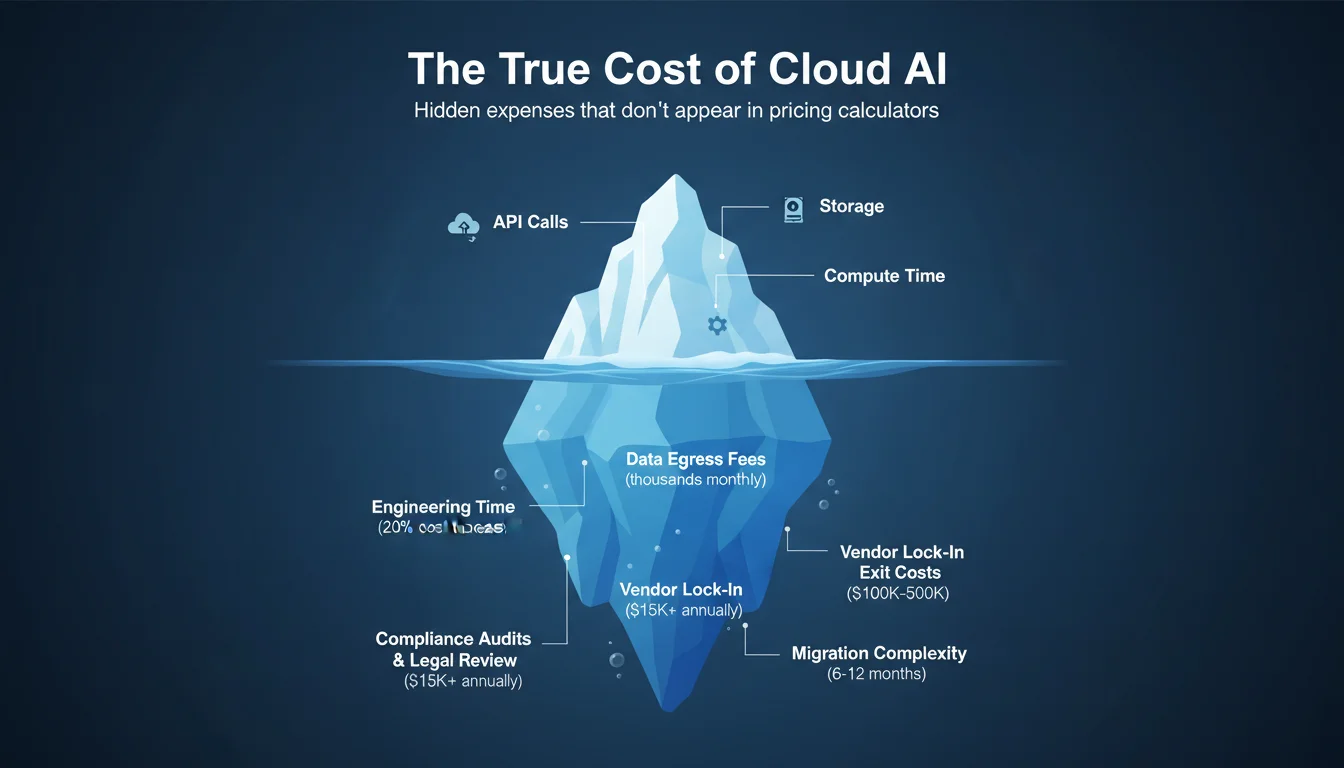
Advertised cloud AI pricing captures obvious costs—API calls, storage, compute time. However, several hidden expenses significantly impact total cost of ownership. Engineering firms evaluating deployment options should account for these often-overlooked factors:
Hidden Cost 1: Engineering Time for Cloud Management
Cloud AI isn’t “set it and forget it.” APIs change, requiring code updates. Rate limits need constant monitoring. Cost optimization demands ongoing attention to prevent budget overruns.
One engineering firm calculated that their DevOps engineer spent 20% of his time managing cloud AI costs, adjusting API usage, and troubleshooting rate limit errors. At a $150,000 salary, that’s $30,000 annually in hidden labor costs.
Hidden Cost 2: Data Preparation & Egress
Getting your engineering documents into the cloud isn’t free. Uploading terabytes of CAD files, technical drawings, and specifications consumes significant bandwidth and time. More importantly, getting data out (data egress) incurs substantial fees.
Migrating 5TB of engineering files from AWS to another provider costs $500+ in egress fees alone—and that’s before accounting for preprocessing, format conversions, and data validation. For firms processing large volumes of technical documents, egress costs can reach thousands of dollars monthly.
Hidden Cost 3: Compliance Audits & Legal Review
Cloud AI introduces third-party data processing, triggering compliance obligations. Quarterly SOC 2 audits, legal review of cloud provider contracts, and third-party risk assessments all generate expenses.
Legal teams spend hours reviewing cloud provider terms of service, data processing agreements, and compliance certifications. One firm reported $15,000 annually in legal costs just reviewing and approving cloud AI vendors—an expense that doesn’t exist with fully on-premise solutions.
Hidden Cost 4: Vendor Lock-In Exit Costs
The true cost of cloud AI includes potential future migration costs. Switching cloud providers requires data extraction, API rewrites, model retraining, and developer education on new platforms.
Engineering firms report migration projects lasting 6-12 months and costing $100,000-$500,000 depending on complexity. This exit cost acts as an implicit penalty, locking firms into providers even when better alternatives emerge. On-premise deployments eliminate this risk entirely.
How to Decide: On-Premise vs. Cloud AI Decision Framework
Choosing between cloud and on-premise AI isn’t one-size-fits-all. Your specific requirements, constraints, and capabilities should drive the decision. Use this framework to evaluate which approach fits your engineering firm:
Decision Criteria
1. Document Volume & Growth
✅ On-Premise if: You have more than 2TB of engineering documents, growing by 500GB+ annually. Large volumes make cloud storage and processing costs prohibitive.
☁️ Cloud if: You have less than 500GB of documents with slow growth. Cloud’s pay-as-you-go model works well for smaller datasets.
2. Regulatory Requirements
✅ On-Premise if: You face ITAR compliance, strict data residency laws, or air-gap requirements. Regulatory mandates often make cloud AI impractical or impossible.
☁️ Cloud if: Standard compliance (SOC 2, ISO 27001) is sufficient and your industry doesn’t face stringent data sovereignty requirements.
3. Budget & Timeline
✅ On-Premise if: You can invest $50K-150K upfront and have a 3+ year planning horizon. On-premise delivers superior ROI over time.
☁️ Cloud if: You need immediate deployment with limited upfront budget. Cloud enables fast starts with minimal initial investment.
4. Technical Expertise
✅ On-Premise if: You have DevOps/ML engineering capability or can hire/train staff. On-premise requires technical skills for deployment and maintenance.
☁️ Cloud if: You have limited technical staff and prefer managed services. Cloud providers handle infrastructure complexity.
5. Performance Requirements
✅ On-Premise if: You need sub-500ms response times or high concurrency. Real-time applications benefit enormously from local processing.
☁️ Cloud if: You can tolerate 2-5 second latency. Many applications don’t require real-time performance.
Scoring Your Requirements
4-5 criteria favor on-premise: You’re a strong candidate for on-premise AI. The benefits clearly outweigh cloud advantages for your situation.
2-3 criteria favor on-premise: Consider a hybrid approach that balances on-premise and cloud capabilities based on specific workloads.
0-1 criteria favor on-premise: Cloud is likely a better fit. Your requirements align well with cloud AI’s strengths.
Don’t Choose Sides: Why Hybrid AI Architectures Are Emerging
The on-premise vs. cloud debate often presents a false dichotomy. Increasingly, engineering firms are discovering that hybrid architectures—combining on-premise and cloud capabilities—offer the best of both worlds.
How Hybrid AI Architectures Work
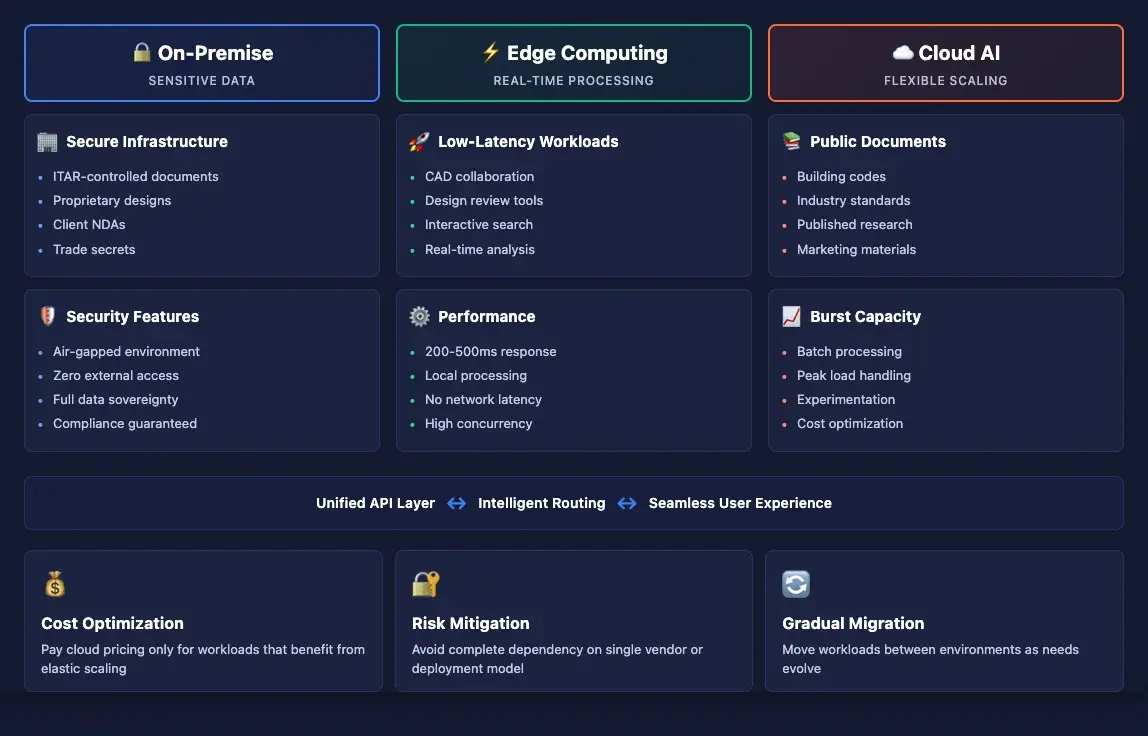
Hybrid approaches segment workloads based on sensitivity, performance requirements, and regulatory constraints:
- Sensitive data processed on-premise: Confidential engineering specifications, proprietary designs, and ITAR-controlled documents never leave your network.
- Non-sensitive data uses cloud: Public marketing materials, published standards, and general reference documents leverage cloud AI for cost efficiency.
- Edge computing for real-time needs: CAD collaboration and design review tools run on local infrastructure for optimal performance, while batch processing jobs may use cloud resources during off-peak hours.
Use Cases for Hybrid Deployment
A structural engineering firm might implement this hybrid architecture:
- Public documents → Cloud: Building codes, industry standards, and published research papers processed via cloud AI services.
- Confidential engineering specs → On-Premise: Client-specific designs, proprietary calculations, and competitive bid documents processed locally.
- Real-time CAD collaboration → Edge: Interactive design review and markup tools run on local servers for immediate response.
Benefits of Hybrid Approaches
- Flexibility to optimize cost per workload: Pay cloud pricing only for workloads that benefit from cloud scalability.
- Gradual migration path: Start with cloud, move sensitive workloads on-premise as needs evolve, without disrupting operations.
- Risk mitigation: Avoid complete dependency on a single vendor or deployment model.
Challenges of Hybrid Deployment
Hybrid architectures aren’t automatically easier than pure on-premise or cloud approaches. They introduce complexity:
- Data governance complexity: You must clearly define which data belongs where and enforce those policies consistently.
- Orchestration requirements: Managing workloads across multiple environments requires sophisticated tooling and processes.
- Integration overhead: Ensuring seamless user experience when some queries hit on-premise systems and others use cloud services demands careful design.
Despite these challenges, hybrid approaches provide a pragmatic middle ground for engineering firms with diverse requirements. They enable optimization on multiple dimensions simultaneously—cost, performance, compliance, and flexibility.
Making Your On-Premise AI Decision
The engineering industry’s relationship with AI deployment is maturing. Early cloud-first enthusiasm is giving way to more nuanced understanding of trade-offs:
- Cloud AI costs are rising and often unpredictable, particularly for document-heavy engineering workflows. What seems affordable at small scale can become prohibitively expensive as usage grows.
- On-premise AI offers control, compliance, and long-term cost savings for firms with regulatory requirements, large document volumes, or performance-sensitive applications.
- The right decision depends on your specific requirements—document volume, regulatory constraints, budget horizons, technical capabilities, and performance needs.
- Hybrid approaches provide flexibility to optimize different workloads differently, though they introduce architectural complexity.
This isn’t a one-time decision. As your engineering firm grows, as AI capabilities evolve, and as regulatory requirements change, your optimal deployment strategy may shift. The key is making informed decisions based on your actual requirements rather than industry hype or vendor marketing.
Whether you choose on-premise, cloud, or hybrid deployment, ensure your architecture aligns with your firm’s strategic priorities: cost predictability, data security, regulatory compliance, and engineering productivity.
Frequently Asked Questions
Is on-premise AI more expensive than cloud AI?
On-premise requires higher upfront investment ($50K-150K) but typically becomes cheaper than cloud after 14-16 months for firms with consistent usage patterns. Cloud AI has recurring costs that scale with usage, making total cost of ownership significantly higher over time. For engineering firms with predictable AI workloads processing 100,000+ pages monthly, on-premise can save $150,000-200,000 over three years after the break-even point.
What are the main benefits of on-premise AI for engineering firms?
Key benefits include predictable costs (no surprise usage bills), complete data control (air-gapped environments possible), regulatory compliance (ITAR, GDPR, data residency), no vendor lock-in (flexibility to change technologies), better performance (200ms vs 2-5 second response times), and deep integration with existing engineering systems like PLM and CAD tools.
Do I need a large IT team to manage on-premise AI?
Not necessarily. Modern on-premise solutions can be managed by 1-2 DevOps or ML engineers. Many firms also consider managed on-premise solutions where a vendor handles deployment and maintenance while keeping infrastructure on your premises. If you have limited technical staff, hybrid approaches allow you to keep sensitive workloads on-premise while using cloud services for less critical applications.
Can I start with cloud and move to on-premise later?
Yes, but migration can be complex and costly. Data egress fees (extracting data from cloud), model retraining, integration work, and developer education can cost $100K-500K depending on scale. Better to evaluate your deployment strategy upfront using the decision framework above. If you anticipate regulatory requirements or cost concerns, starting with on-premise or hybrid may avoid expensive migration later.