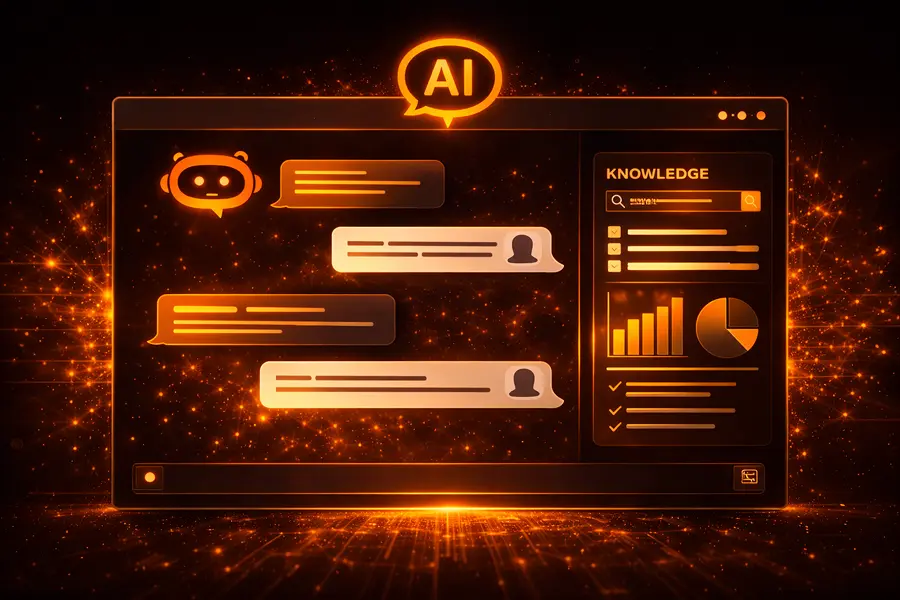




Adding AI technology into an app generally does not stem from a grand vision. It means solving a re-occuring problem. If users are stuck on a task, making the same choices over and over, or lagging at a step. AI can help mitigate that friction and smooth the experience.
The teams that do this right don’t start with AI models or algorithms. Instead, they tackle friction head-on, like the teams behind Duolingo, Spotify, and Figma. They sneak AI into things people already use. The result? Better recommendations, smarter suggestions, and snappy actions that fit what users are already doing. There’s no big bang, just small improvements, tested and tweaked in real life, and refined until they feel right.
AI technology adoption is moving fast, with five European businesses adopting AI every minute, though the gap in adoption between startups and large enterprises is widening, potentially creating a two-tier AI economy. According to AWS’s report Unlocking Europe’s AI Potential 2025, 42% of European businesses now consistently use AI, and over 90% of those report increased revenue or productivity — equating to nearly three million companies across the continent in the past year. Rather than asking “should we use AI,” our real challenge is understanding how to use artificial intelligence without harming user experience, performance, or trust.
This guide explains practical steps for achieving successful AI integration. The focus is to identify user problems, match AI to existing features, and ensure real improvements. You want your app to benefit users seamlessly without unnecessary complexity or disruption.
Table of Contents
Why Should We Integrate AI?
So why do we use AI in our apps? Well, it’s mainly because AI capabilities cover some things that just can’t be scaled with people alone. And you see its effects in three main areas: retention, costs, and decision quality.
- Retention gets a boost when your AI app starts adapting to the user rather than being stuck with the same old rigid flows all the time. Personalized suggestions, intuitive defaults, and context-sensitive guidance really do cut down on friction and let users get the job done faster.
- Operational costs come down when an AI application takes over the routine stuff that doesn’t need human judgment, like ticket routing, document processing, input validation, or anomaly detection. This means your team can then focus on the tasks that really do need a human’s touch.
- Decision-making improves when AI capabilities allow the app to process more data than a human could handle, enhancing forecasting, risk detection, and real-time optimization.
The real benefits you get by integrating AI into your app are:
- Increasing user engagement and retention
- Cutting down on manual effort and operational costs
- Speeding up and making decisions more accurately
- Scaling your workflow without having to hire more people
- Uncovering insights that were previously hidden in the data
But the value of an AI solution is lost if it does not make tasks easier, faster, or produce meaningful improvements.
AI Strategy Before Code
The majority of AI failures do not arise from bad models; they arise from bad framing.
Teams move fast, wire in a model, and only later ask what actually changed for the user. On paper, the feature works. In practice, nothing gets meaningfully better. Here’s how that usually happens.
Mistake 1: Falling in Love With the Model
A lot of teams start integrating AI by picking a technology before they even know what problem they’re trying to solve. Decisions like “let’s add some generative AI” or “we need to integrate an LLM” get made before they even have a clue how it will help with a particular user task.
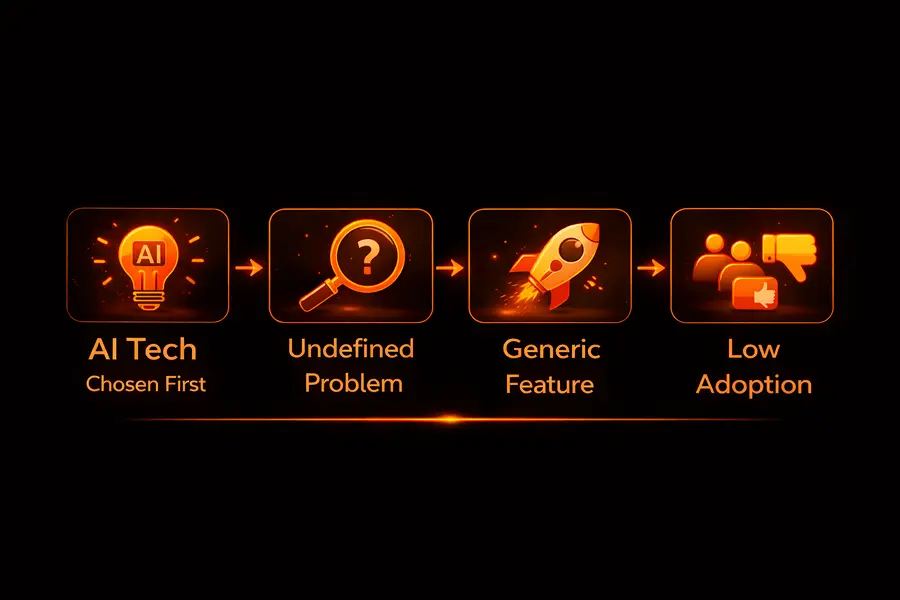
When the problem is defined after the tool, AI features tend to be generic and loosely connected to real product workflows, which limits adoption and measurable impact.
Mistake 2: Defining Success Too Broadly
Vague AI tasks like “improve user experience” or “make onboarding smarter” are impossible to measure. Without clear metrics, it is hard determine if the AI integration is effective, and AI app development often drifts into unfocused features.
Effective AI use cases are narrowly defined, targeting a specific outcome:
- Shorten a particular step.
- Reduce a recurring error.
- Eliminate a repetitive manual task.
A narrow scope doesn’t reduce impact; it makes success measurable and failure visible.
Mistake 3: Treating AI as a UX shortcut
In most cases, good intentions are the starting point. In situations where something feels clunky, confusing, or slow, artificial intelligence is an attractive solution.
Instead of fixing the underlying flow, teams add intelligence on top of it:
- A form that users don’t understand gets an AI helper.
- A complex configuration gets auto-generated suggestions.
- A brittle ruleset gets replaced with “learning.”
The problem isn’t that the AI app fails. It’s that it masks the real issue. Users still don’t understand what’s happening, except now the system is harder to predict. When something goes wrong, there’s no clear rule to fall back on.
In many of these cases, a simpler fix would outperform AI: better defaults, clearer copy, fewer choices. AI should amplify a solid flow, not compensate for a broken one.
Mistake 4: Assessing System Impact Only After Launch
Some issues do not appear within the feature itself but emerge across the system. A predictive output can influence user behavior. Next, a recommendation may change the type of data generated. Automated decisions can shift workloads onto teams that are unprepared. These effects are often not apparent during testing or demonstrations.
When strategic planning is skipped, these consequences become visible only after deployment. Support requests may rise, trust in the system can decline, and teams may find that AI outputs do not align with existing processes or may even conflict with them.
At this point, the model is often blamed, but the underlying issue is a lack of early consideration for downstream effects. AI functions within broader workflows, and its impact should be evaluated across the system before release.
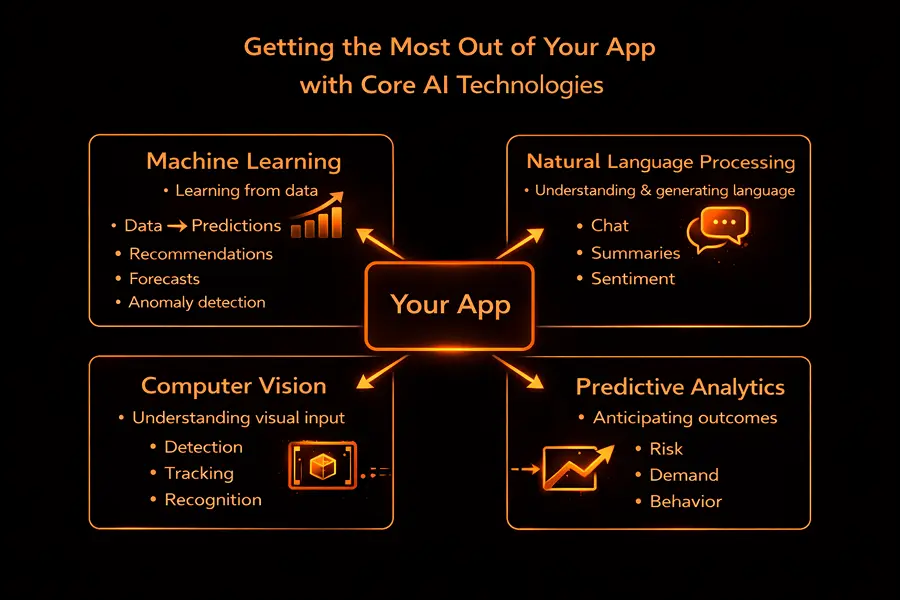
Getting the Most Out of Your App with Core AI Technologies
Once you’ve identified that your business has a real problem that needs solving, it’s time to pick the right Artificial Intelligence (AI) features to bring into your app. But don’t fall for the hype – the most effective AI integration isn’t about jumping on the latest trends, but about finding tools that are going to genuinely help your app work better.
1. Machine Learning (ML)
Machine learning is what lets your AI app actually get smarter with time. It lets you train your app to notice patterns in data and make useful predictions without needing a human to program it up in advance. This is the stuff that happens behind the scenes to make your app do things like:
- Give recommendations based on what you like and what you do.
- Work out what you want to buy (or what’s going to break) next.
- Do all that data analysis for you so you can get a handle on what’s going on.
The thing with machine learning is that most of the time, your app is going to be using someone else’s pre-trained models, which you then fine-tune using your own data. And guess what? The quality of that data is everything: if it’s rubbish, your app is going to end up being rubbish too. So it’s a good idea to get your data engineers, data scientists, and machine learning people working together to make sure your training data is solid.
2. Natural Language Processing (NLP)
Natural language processing is the bit of AI that lets your app understand and work with human language, so you can have a real chat with your app or get your app to write something for you. And it’s the tech that powers a whole load of the most useful AI-powered features, like:
- AI Chatbots that can handle your customer service for you.
- Getting a sense of what people think about your app (or your competitors).
- Having your AI-driven app summarize a long piece of text or even write it for you.
With NLP, the focus isn’t just on generating text. It’s about ensuring that AI responses convey the intended meaning, provide value to users, and avoid producing content that is inappropriate or incorrect.
3. Computer Vision (CV)
Computer vision is an AI capability that allows your app to interpret visual input. It can identify objects in images, detect anomalies, or extract meaningful information, and it’s used in a variety of apps, such as:
- Getting rid of the background in a photo
- Working out if someone is doing something dodgy
- Helping your fitness app track your progress and what you need to work on
Because computer vision is so compute-intensive, most of the time your app will be sending all the heavy lifting to the cloud and just using a lightweight model on the device to do the real-time stuff. This way, you get the best of both worlds: a fast app and a smart app.
4. Predictive Analytics
Predictive analytics is the AI component that lets your app look into the future and tell you what’s going to happen. This is the stuff that powers all the really useful features, like:
- Working out what you’re going to do next (so you can get ahead of it)
- Spotting any problems that might be coming down the line
- Giving you recommendations based on lots of different factors
For a deeper look at the mechanics behind this, see our blog post: AI Agents for Data Analysis: From Workflows to Insights. Predictive analytics gives your app a real edge and helps keep users engaged, satisfied, and coming back.
How AI Fits In
The good news is that AI isn’t going to come in and replace all the tech you’ve already got – it’s just going to enhance your existing app. So here’s what you need to do:
- Get your AI model talking to your existing systems with some APIs or on-device SDKs
- Figure out how to get all your new AI features to work with your existing business processes.
- Test your app and make sure your users can actually use the new AI features.
- Keep an eye on how well it’s all working and make sure it keeps getting better.
It’s all about striking a balance: giving your users the best experience possible, while also making sure they trust your app to do the right thing with their data. And if you get this right, your app is going to end up being a smart, capable thing that really gives your users the edge they need to succeed.
Methods of AI Integration
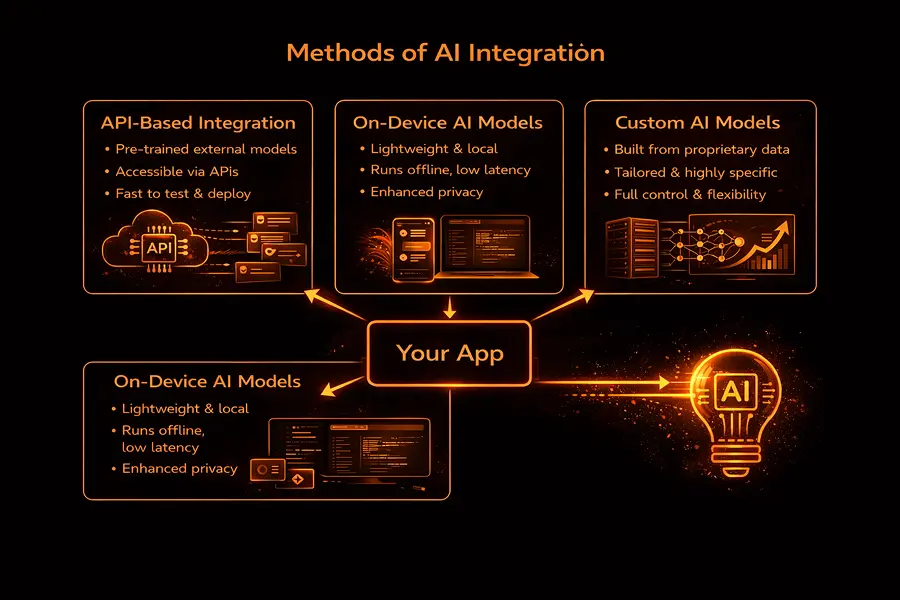
Once the AI use case is given the green light and the company is confident it’s a good fit, the next step is figuring out how to integrate AI into an app. This choice will have an impact on performance, cost, scalability, and long-term flexibility, and there’s no one-size-fits-all answer. Most established products are able to mix and match different approaches, depending on the particular AI-driven feature they’re working with.
API-based AI Integration
API-based integration is the fastest and most straightforward way to integrate AI into your app. Instead of building AI algorithms from scratch, you can just connect directly to external AI services via a well-defined API. This approach is particularly handy for companies that want to test out an idea quickly without having to invest too much in infrastructure.
API-based AI integration is often used for:
- Natural language processing
- Conversational AI and chatbots
- Content generation and summarization
- Recommendation logic
- Analytics and classification tasks
The main advantage of this method is speed. Companies can get from prototype to production in a matter of weeks, rather than months. Plus, APIs make it much easier to manage AI model maintenance, scaling, and optimization.
However, there are some trade-offs to consider. For one, cost control can be a challenge. If you’re making a lot of API calls, that can start to get expensive quickly. Production systems usually rely on smart caching, batching up requests, and having fallback logic to mitigate this issue. You also want to design around latency and rate limits, especially if you’re building user-facing features where response times can really affect the user experience.
Overall, API-based AI solutions work best when speed and flexibility are more important than having total control over the underlying technology.
Embedding AI Models On-Device
On-device AI involves sticking a lightweight machine learning model directly into mobile or edge devices. This approach is becoming increasingly common in mobile app development, especially when you need to squeeze every last bit of performance, privacy, or offline functionality out of your app.
On-device AI is well-suited for:
- Image recognition and visual processing
- Voice recognition and speech commands
- Personalization based on local user behavior
- Real-time interactions with super low latency
Since the data is being processed locally, sensitive information doesn’t have to leave the device. This can make a big difference for companies that need to be extra careful about user privacy. On-device models also feel more responsive since they don’t depend on the network being available.
The downside is that you’re limited by the capabilities of the device. Mobile devices have limited computational resources, so you need to make sure your models are carefully optimized to run smoothly. Updates are slower too, since model improvements are tied to app releases rather than backend deployments.
A lot of apps take a hybrid approach: on-device models for a super-fast response and cloud-based AI for the heavier lifting.
Custom AI Model Development
Custom AI models are built when off-the-shelf solutions just aren’t going to cut it. This might happen when the problem is super specific to your industry or when you’ve got a lot of proprietary data that gives you a real competitive edge.
This approach makes sense when:
- Your problem is so specific that no one else has tackled it before
- You need a really high level of accuracy or explainability.
- Regulatory or compliance issues mean you can’t use third-party AI.
- You need a really tight belt for AI decision-making.
Custom development gives you complete control over the model and lets you tailor it to your exact data and workflows. However, it’s also a much more resource-intensive option: it requires specialist skills, longer timelines, and ongoing maintenance.
Custom models are rarely your starting point. Most teams tend to validate the use case with simpler solutions first, and only move on to custom development once they’re sure it’s worth the extra work.
Data Collection & Data Quality
Data isn’t just an input for AI systems: it’s something that often determines how reliable, trustworthy, and useful their outputs turn out to be, even when using pre-trained models.
Data Pipelines & Ingestion
When it comes to production AI systems, you’ll typically find that they rely on some kind of structured data pipeline to gather, process, and store data from multiple sources, like user interactions, internal systems, and external services.
A good data pipeline covers:
- Grabbing relevant information from user actions and system logs. Basically, all the interesting stuff that happens in your system.
- Real-time vs historical processing: how to handle the data as it comes in vs what’s happened already.
- Validation checks to make sure all the data fits into your schema the way it should.
- Storage that’s specifically optimized for analytics or model training: don’t choose a generic solution that will cause you trouble in the future.
You have to be prepared for the worst-case scenarios with pipelines; they need to be able to handle incomplete data, huge spikes in volume, and delayed events without blowing up your whole system.
Getting Your Data Ready & Keeping an Eye on Quality
Data preparation is one of those phases that usually takes the longest, but its impact on performance is way bigger than any other part of AI integration.
Key activities include:
- Cleaning and tidying up the data: getting rid of duplicates, making sure formats are right, and standardizing units.
- Handling missing or inconsistent values: either replacing poor quality data with something sensible or just excluding them if it won’t mess with patterns too badly.
- Making sure the data is diverse and representative: you don’t want your AI model to overfit to just a single user group or edge case.
- Keeping data out of production: preventing data that shouldn’t be there from finding its way into the system, especially data from the training phase.
Automated quality checks are a must. Without them, your AI models can silently start to degrade as the data distribution changes.
Watching out for Drift & Model Decay
Even high-quality data isn’t static: user behavior shifts, new features come along, and external conditions change. This leads to data drift, where the incoming data no longer matches what the model was trained on.
Production systems should be monitoring:
- Changes in input distributions: how the data that’s coming in is changing over time.
- Output confidence and error rates: how well your model is doing its job.
- Changes in user feedback patterns: You don’t want users to get confused or annoyed.
When data drift is detected, you might need to retrain your models, adjust your features, or revise some assumptions. Otherwise, you can expect to see accuracy and user trust drop gradually.
Data Privacy and Accountability
As AI systems grow in complexity, sensitive data governance becomes super important. You need to be able to answer basic questions like:
- Where did this data come from?
- Who’s got access to it?
- How long is it going to be stored?
- How is it being used in the model?
Having clear ownership and access controls in place can really help reduce the risk of non-compliance and make your system easier to maintain as it grows.
It’s the level of architectural depth and rigor that sets experimental AI features apart from systems that can actually survive the real world: real traffic, real users, and real expectations.
Step-by-Step: Integrating AI into a Mobile App
AI integration works best when it’s treated as a product capability, not a technical add-on. Each stage builds constraints for the next one: unclear goals undermine models, weak data erodes trust, and poor UX nullifies even accurate outputs. The steps below outline a practical path from idea to production-ready AI, with a focus on long-term reliability rather than quick demos.
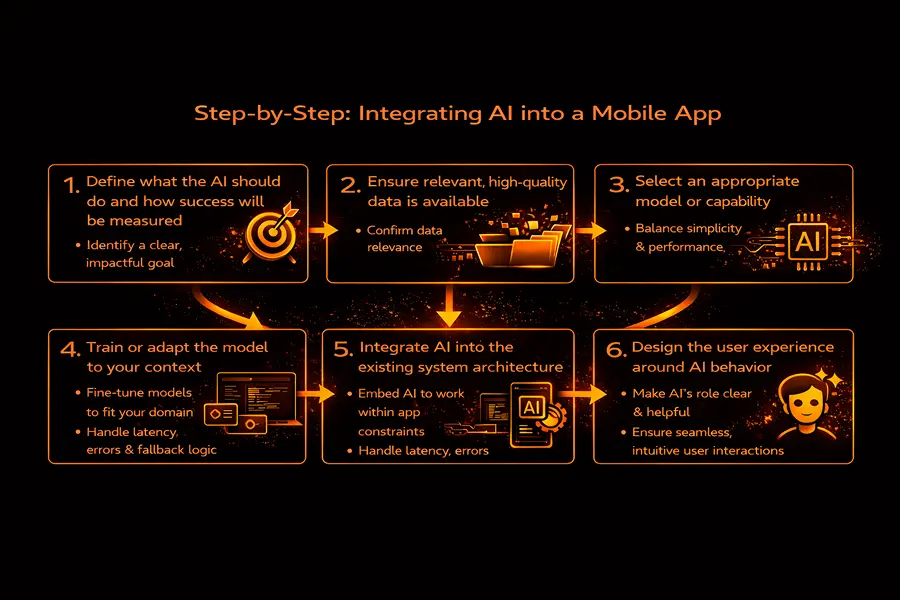
1. Define what the AI should do and how success will be measured
Start with a single, well-scoped problem the AI is meant to improve. Avoid broad ambitions like “make the app smarter.” Instead, focus on a concrete outcome: reducing time spent on a task, lowering error rates, or removing a repetitive manual step.
Define success upfront using observable metrics. This could be behavioral (completion time, retries), operational (support load, manual reviews), or outcome-based (accuracy, acceptance rate). Clear metrics keep AI work grounded and make trade-offs visible later.
2. Ensure relevant, high-quality data is available
Once the task is defined, it becomes clear what data is actually needed. The goal isn’t volume, but relevance. Data should reflect real user behavior, edge cases included, not idealized flows.
At this stage, teams often uncover gaps: missing signals, inconsistent formats, or data that’s too biased toward a narrow group of users. Identifying these issues early prevents fragile models and limits downstream surprises.
3. Select an appropriate model or capability
Only after the problem and data are clear does it make sense to choose the technology. In many cases, simple models or existing APIs are sufficient. More complex approaches are justified only when the use case demands higher accuracy, explainability, or tighter control.
The right choice balances performance with maintainability. A model that’s slightly less sophisticated but easier to monitor and adapt often delivers more real-world value.
4. Train or adapt the model to your context
Pre-trained models rarely work well out of the box. They need to be adjusted to reflect domain-specific language, user behavior, and real operational conditions.
This phase is as much about understanding failure modes as improving accuracy. Observing where confidence drops, errors cluster, or outputs become inconsistent informs both technical safeguards and UX decisions.
5. Integrate AI into the existing system architecture
Integration goes beyond calling a model endpoint. AI needs to operate within real system constraints: latency limits, fallback behavior, error handling, and interaction with other services.
Decisions made here affect reliability and perception. Users may never notice when things work smoothly, but they quickly lose trust when responses lag, fail silently, or behave unpredictably.
6. Design the user experience around AI behavior
AI output should feel like a natural extension of the workflow, not a separate feature. Users need to understand when AI is involved, what it’s responsible for, and how much control they retain.
Good AI UX makes uncertainty visible without being disruptive. It supports reversibility, encourages confidence without over-automation, and fits into existing habits rather than forcing new ones.
7. Monitor, iterate, and improve continuously
Launching an AI feature is the beginning, not the end. Real usage introduces variability no test environment can replicate. Inputs become messier, usage patterns shift, and performance gradually drifts.
Ongoing monitoring, feedback loops, and iteration are essential to keep the system useful and trustworthy over time. AI that isn’t maintained doesn’t usually fail loudly — it degrades quietly.
Even when every step is executed carefully, AI behaves differently once exposed to real users and real traffic.
What Actually Happens After Launch
The moment an AI feature hits production, its behavior changes. Not because the model suddenly gets worse, but because real users introduce chaos that no test suite can simulate.
People paste half-finished inputs, retry actions repeatedly, ignore guidance, and use features in sequences the team never anticipated. That’s when seemingly “accurate” models start producing brittle results. Latency creeps up. Confidence scores stay high while output quality quietly drops.
At this point, classic QA can only take you so far. The real test is how the system behaves when things aren’t ideal. Does it slow down without breaking? Does it know when to say “I’m not sure” instead of making something up? Can teams spot issues early, before users start filing tickets?
Product teams that see launch as the finish line usually get caught off guard. AI systems rarely crash in obvious ways. They slip. Performance fades, responses get less reliable, and problems build quietly until someone finally notices.
Why Trust Is Built Through Design, Not Statements
It’s tempting to think trust comes from accuracy. In practice, it comes from predictability. Users are surprisingly tolerant of AI limitations when those limits are clear. What frustrates them is not that the system is imperfect, but that its behavior feels opaque or inconsistent. Over-automation is a common culprit here. When AI takes control without offering context or escape hatches, users disengage.
Good AI UX doesn’t overexplain, but it does signal intent. It makes it obvious when AI is involved, what it’s responsible for, and where human judgment still applies. Defaults help, but reversibility matters just as much.
In higher-stakes scenarios, automation without oversight isn’t efficiency, it’s risk. Systems that leave room for human review don’t slow teams down. They make adoption possible.
Data Protection in AI-Powered Apps: A Key Constraint for Performance and User Engagement
AI systems interact with data in ways that can be difficult to fully trace after the fact. Inputs are transformed, combined, and reused across different features, sometimes in ways that were not anticipated during the initial design. This makes privacy and security considerations critical; treating them as “we’ll address later” often leads to problems.
Basic safeguards like encryption, access controls, and secure API design are essential. Additional considerations include data retention and reuse: how long is information stored, can outputs be traced back to the original inputs, and how should requests for data deletion be handled?
Generative systems add another layer of complexity. Prompt injection, data leakage through outputs, and misuse of AI-generated content aren’t edge cases anymore. They’re normal operational risks.
Common Pitfalls in AI-Powered Apps
Most AI projects don’t fail dramatically. They stall. The model works, but not reliably enough to automate. Data exists, but not in a form that supports iteration. Outputs are technically correct, but don’t quite fit the workflow they’re meant to improve.
This is where product decisions matter more than model tuning. Confidence thresholds, fallback paths, and clear escalation rules often deliver more value than chasing marginal accuracy gains. Trying to hide uncertainty usually backfires. Exposing it, carefully, gives users something to work with.
Shipping AI Without Forcing It on Users
Not every AI feature needs to arrive fully formed. Lightweight integrations, especially those built on existing APIs, can ship quickly and validate assumptions early. More complex systems take longer, largely because data pipelines, monitoring, and safeguards take time to get right. The ongoing cost usually comes from keeping the system healthy, not from building it once.
This is where phased rollouts earn their keep. Limited exposure reveals real usage patterns without committing to the entire product. It also gives teams a chance to explain what’s changing and why.
Conclusion
Building AI into a product isn’t about showing what the technology can do. It’s about deciding where it genuinely helps and where it shouldn’t be involved at all.
Clear intent, solid data practices, and respect for users matter more than sophistication. Teams that treat AI as a long-term capability (something to maintain, question, and refine) are the ones that turn experimentation into real, durable value.
To make AI genuinely useful in your product, consider our AI integration services to start integrating AI into your app with expert guidance.